
 Demo Software
Demonstration and simulation software (all Windows platforms) for the Active Trawl System as well as videos of
concept demonstrator trials are available on Email request.
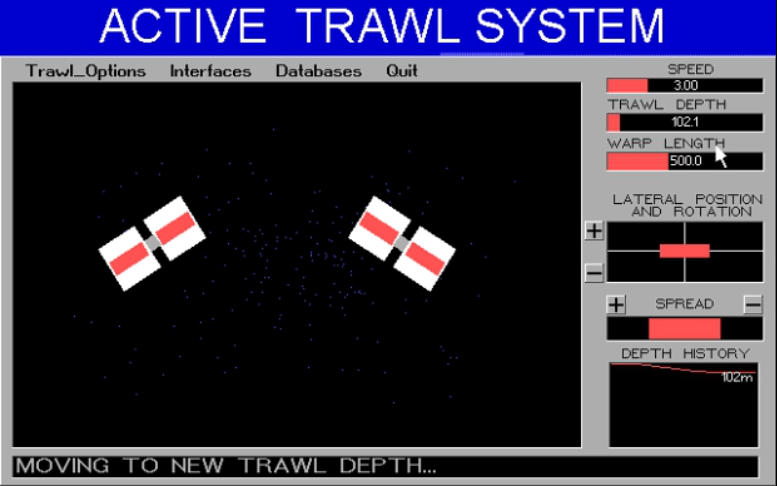
The simulation program illustrates dynamically how the system reacts to changes in the trawl parameters. A typical
display is shown below.
The mouse-driven control panel on the right hand side of the screen allows the trawl speed, warp length, trawl depth,
lateral position, net opening and trawl rotation to be changed at any time. The four white rectangles each represent a
rotor (two per VTVD). The widths of the red band within the rectangles are proportional to the rotational speeds of
the rotors i.e. the wider the red band, the faster the rotor is turning. Modify any of the parameters, and you will see
how the speeds and heel angles change until the set conditions are achieved and equilibrium is obtained.
There are also a number of pull-down menus with brief descriptions of features and functions available in a working
system.
The demonstration program shows typical screens and menus as they would be displayed on the ATS computer. The
program has, at this moment in time, limited functionality. However, it does illustrate how the ATS interfaces with
other equipment as well as some operations.
Demo Software
Demonstration and simulation software (all Windows platforms) for the Active Trawl System as well as videos of
concept demonstrator trials are available on Email request.
The simulation program illustrates dynamically how the system reacts to changes in the trawl parameters. A typical
display is shown below.
The mouse-driven control panel on the right hand side of the screen allows the trawl speed, warp length, trawl depth,
lateral position, net opening and trawl rotation to be changed at any time. The four white rectangles each represent a
rotor (two per VTVD). The widths of the red band within the rectangles are proportional to the rotational speeds of
the rotors i.e. the wider the red band, the faster the rotor is turning. Modify any of the parameters, and you will see
how the speeds and heel angles change until the set conditions are achieved and equilibrium is obtained.
There are also a number of pull-down menus with brief descriptions of features and functions available in a working
system.
The demonstration program shows typical screens and menus as they would be displayed on the ATS computer. The
program has, at this moment in time, limited functionality. However, it does illustrate how the ATS interfaces with
other equipment as well as some operations.
Copyright Active Fishing Systems 2016
Active Fishing Systems
The Emerging Light in Fishing Technology
Active
Trawl
System